
Seen a few emails flying around the other day about how to add a remote Syslog server to the vCD cell once it has been installed. This has caught out a few people in the past couple of months. Follow the documentation and edit the syslog section in /opt/vmware/cloud-director/etc/responses.properties then re-run the configuration. Add your Syslog server to the audit.syslog.host line in /opt/vmware/cloud-director/etc/global.properties Restart the vCD Cell [service vmware-vcd restart] This will then configure vCD for using a remote syslog server. Please note: This is only required if you have an already installed or pre-configured vCD cell. For all fresh installations follow the guidelines in the installation guide.
Archive | Cloud Computing
All blog posts under this category are related to Cloud Computing.
Ephemeral Ports with VMware vCloud Director – To use or not to use?
An interesting topic came up the other day between some of us in the cloud team, regarding whether Ephemeral Ports should be continued to be used with vCD deployments. A colleague of mine Aidan Dalgleish (Senior Consultant, VMware TS Cloud Practice) kindly documented our discussions and wrote up the decisions. He can be found on LinkedIn. Background The topic of Portgroup binding was discussed and Ephemeral binding was selected as the preferred option for vCD created Portgroups for some of the following reasons: * Due to the dynamic nature of vCloud Director it is often difficult to define how many devices will be connected to a given Portgroup * Easy to code as there is no requirement to monitor and dynamically adjust the number of ports configured on the Portgroup as with Static/Dynamic * Very flexible due to their being no requirement to define a number of ports and hence […]
VMware vCloud Director 1.0.1 is now GA
VMware vCloud Director 1.0.1 was released for general availability yesterday. The release notes can be found by clicking here I will post further information when I return from PEX.
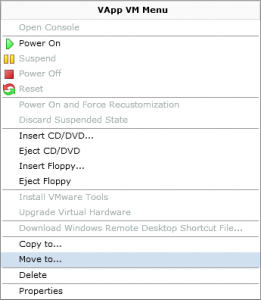
Importing more than one VM into a vApp in VMware vCloud Director
Working on my home lab today, I discovered that once you have imported a VM from vSphere and created the vApp there wasn’t an option to then import another VM into the same vApp. This really frustrated me as I wanted to import 4 VM’s into the same vApp in the cloud. The easy way I found to do this is as follows: 1) Import the second VM into a new vApp 2) Open up the vApp once the import has completed 3) Right click and select ‘Move To’ 4) Select the Destination vApp 5) Configure the VM Full Name, Computer Name and Networks 6) Check the Networking details 7) Click Finish That’s it, and now you have the second VM imported into the vApp. I really think we need an option within a vApp to import more than one VM, and will mention this next time there is a […]
VMware vCloud Director Log files
Working on my home lab the other day, I had forgotten where the log files were kept for VMware vCloud Director. I thought I would document there location and what the purpose of these log files are for. Path to log files:/opt/vmware/cloud-director/logs UPDATE: Path to log files as of vCloud Director 1.5 changed to /opt/vmware/vcloud-director/logs cell.log The first log file that I always use, is the cell.log. This provides information on what status the cell services and application start up are at. Generally I use tail -f to view the live status when starting a vCD Cell. Application startup begins: 1/18/11 10:48 PM Successfully bound network port: 80 on host address: 192.168.10.152 Successfully bound network port: 443 on host address: 192.168.10.152 Application Initialization: 9% complete. Subsystem ‘com.vmware.vcloud.common.core’ started Successfully connected to database: jdbc:oracle:thin:@192.168.10.150:1521/xe Successfully bound network port: 443 on host address: 192.168.10.53 Successfully bound network port: 61616 on host address: […]